Layers & comps
Compositions plus shape, text, solid, null, adjustment, light, and camera layers, structured the way you'd build them yourself.
Now available on Windows. MotionAmigo runs on Windows 10 and 11, alongside macOS.
Your AI sidekick for Adobe After Effects.
MotionAmigo brings AI agents into After Effects. Describe what you want, drop in references, and a local agent builds the composition as native, editable layers — shapes, text, expressions, motion paths, masks. Powered by Claude Code or Codex, on the subscription you already pay for.
Everything the agent makes is native and editable. No flattened output, no black box. Restructure the comp, swap the palette, retime the whole thing. Nothing's locked.
Compositions plus shape, text, solid, null, adjustment, light, and camera layers, structured the way you'd build them yourself.
Wiggle, loops, easy-ease, velocity. Motion paths, trim paths, and markers, all live and editable.
Real Bézier paths and masks, with every point editable.
Type what you want. Drop in references, a palette, a storyboard, whatever sets the direction.
A local agent assembles the composition as native layers, live in your project.
Steer it mid-run, stop it if it drifts, or revert and try again. Nothing you do can break the project.
No keyframes to grind, no rigs to wire by hand. Tell MotionAmigo what you want in plain language and it builds the motion natively in After Effects in minutes. What used to eat an afternoon becomes a quick back-and-forth, so your time goes to directing, not busywork.
“Unbelievably cool tool. What’s nice is, I can take my idea and have it realized in minutes, rather than fiddling with the toolset.”
Start with the full app. The trial holds nothing back.
Components are how you hand the agent a real brief. Set your palette, type styles, transforms, timing, and more, then on send it bundles every component into one rich context, so it generates accurate results on your timeline instead of guessing from a single sentence. Save any setup you like as a reusable preset.
Curate a palette of swatches for the agent to paint with.
Define named font styles (family, weight, size, tracking) it reuses across text layers.
Pick which transforms to keyframe and how they should feel: bounce, anticipation, squash and stretch.
Generate algorithmic point layouts (grid, radial, spiral, halftone) for the agent to place layers on.
Set gravity, bounce, friction, and mass, and the agent simulates motion that obeys them.
Sketch keyframes or layout ideas freehand; your strokes go to the agent as visual reference.
Sketch is a live AI sandbox for the stuff After Effects won't do natively: generative visuals, interactive prototypes, complex layouts. The agent writes and runs the code (HTML, SVG, React, or PixiJS), renders it live in the panel, and generates tweak knobs on the fly for whatever it built. Want changes? Just chat with the agent in a text component and it re-dials the knobs in plain language.
When it looks right, bring it into your comp two ways: as footage, or as a real rig of shape layers, control sliders, and expressions you can keep editing in After Effects.
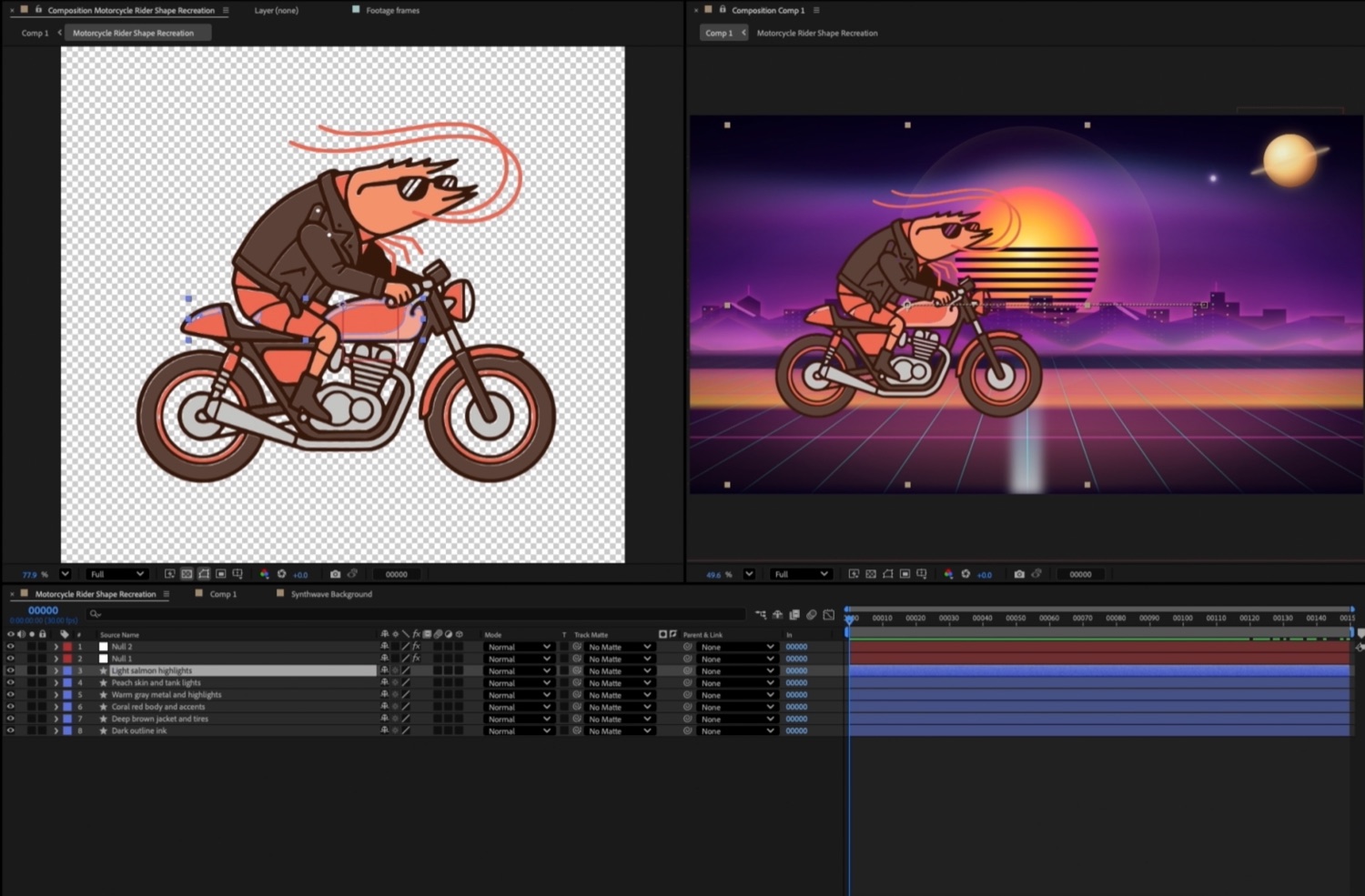
Drop in a reference image and the agent recreates it as native, editable layers: clean shapes, named by part, ready to restyle, recolor, and animate. Not a flat import, a real comp you can take apart.
Open the panel and MotionAmigo works out what's missing, then hands you a button for each fix.
It works the same for Claude Code or Codex, on macOS or Windows. Pick an agent and the panel checks what that agent needs on your system, then adapts the steps to match.
Each step re-checks itself and turns green the moment it lands, so you're never left guessing whether it worked. The clip shows Codex on macOS.
It all runs on the Claude or ChatGPT plan you already pay for, right on your own machine. Nothing new to set up, nothing new to meter.
The full app, every feature, nothing locked. Try it on your own project, nothing to lose.
Get MotionAmigo on aescriptsNew features, releases, and the occasional peek behind the curtain. Subscribe and we'll keep you posted.